monday CRM Explained:
The AI-Powered CRM for Revenue Teams
Traditional CRMs were built for data entry. monday CRM was built for selling. Here’s a practical look at what it does, how it compares, and whether it fits your team.
The CRM Problem Nobody Talks About
Most CRMs share the same fundamental issue: they’re built for management visibility, not for the people who use them every day. Sales reps spend hours logging activities, updating fields, and building reports instead of doing the thing they were hired to do: sell.
The result is predictable. Adoption drops. Data quality suffers. Forecasts become unreliable. And the organization ends up paying for a system that creates more administrative work than it eliminates.
This isn’t a technology failure. It’s a design philosophy problem. Most CRMs were architected decades ago around the concept of “system of record”: a place to store customer data. monday CRM starts from a different premise: the CRM should be a “system of action” that actively helps revenue teams sell.
The monday CRM Philosophy: Sellers Should Just Sell
monday CRM is built on the monday.com Work OS, which means it inherits a design language and workflow engine that millions of teams already use for project management. But the CRM product isn’t just monday.com with a pipeline view bolted on. It’s a purpose-built revenue platform that leverages the Work OS foundation for cross-team visibility.
The core philosophy is straightforward: automate everything that isn’t selling. Activity tracking, follow-up scheduling, lead assignment, data enrichment, forecast calculation. If a task doesn’t require human judgment, the CRM handles it.
This philosophy shows up in three design decisions that distinguish monday CRM from traditional platforms:
No-code everything. Pipeline stages, automations, dashboards, and custom fields are all configurable through a visual interface. Revenue operations teams can build and iterate without developer involvement or vendor consulting.
Cross-functional by default. Because monday CRM lives on the Work OS, sales data naturally connects to marketing campaigns, customer success workflows, project delivery boards, and finance tracking. There’s no need to build integrations between departments using the same platform.
AI as a co-pilot, not an add-on. AI features are embedded directly into the CRM workflow rather than offered as a separate product or premium tier. Lead scoring, email composition, and deal insights happen within the tools reps already use.
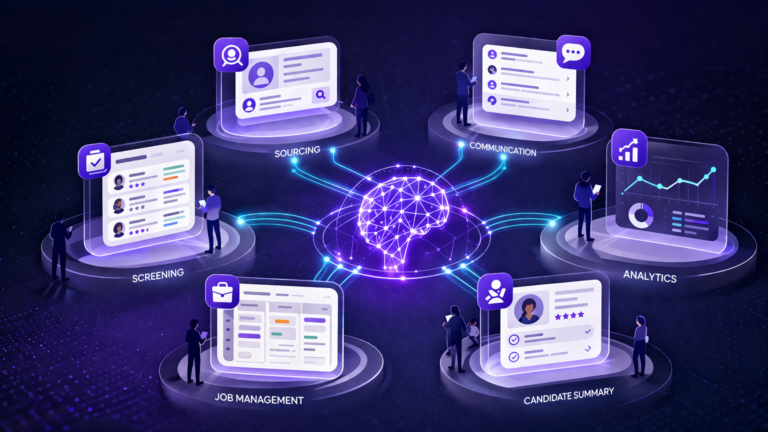
AI-Powered Features: What monday CRM Actually Does
AI in CRM has become a marketing buzzword, so it’s worth being specific about what monday CRM’s AI actually does versus what’s still aspirational. These features are live and available on the Pro plan.
The Lead Agent (internally called Lexi) autonomously sources prospects, enriches lead data from public sources, and applies predictive scoring based on your historical conversion patterns.
How It Works
- Sources prospects from public data matching your ideal customer profile
- Enriches lead records with company size, industry, tech stack, and contact details
- Scores leads using machine learning trained on your past conversions
- Dynamically re-scores as new signals emerge (not static, one-time scoring)
- Routes qualified leads to the right rep with full context and recommended next steps
AI-powered automation blocks let you build complex workflows without code. Automate follow-ups, task creation, notifications, and deal stage transitions based on intelligent triggers.
What You Can Automate
- When a deal moves to “Proposal Sent,” auto-create a follow-up task in 3 days
- When a lead score exceeds threshold, assign to a rep and notify via Slack
- When a deal is closed-won, trigger onboarding workflows in a connected board
- When no activity is logged for 7 days, flag the deal and alert the manager
- Pro plan supports 25,000 automation actions per month
AI-driven insights surface pipeline health issues, at-risk deals, and forecast accuracy without requiring reps to manually update deal stages or probability estimates.
Pipeline Insights in Practice
- Flags deals showing declining engagement or stalled progression
- Analyzes email sentiment to detect cooling relationships
- Compares current pipeline health to historical patterns
- Suggests next-best-action recommendations for at-risk deals
- Generates forecast projections based on actual pipeline velocity, not rep estimates
AI assists with email composition, suggests optimal send times, and automatically logs all communication activity to the relevant deal record without manual data entry.
Communication Features
- AI drafts personalized emails based on deal context and history
- Automatically logs emails, meetings, and calls to deal records
- Suggests follow-up timing based on recipient engagement patterns
- Smart templates adapt content based on deal stage and contact role
- Two-way email sync keeps communication history centralized
Core Capabilities Beyond AI
AI gets the headlines, but the foundation of monday CRM is a well-designed revenue workflow engine. These are the core capabilities that make it work for sales teams on a daily basis.
Visual pipeline management. Drag-and-drop deal boards with customizable stages, probability tracking, and weighted pipeline views. Multiple pipelines for different products, regions, or deal types are all manageable from a single workspace.
Activity tracking. Calls, emails, meetings, and notes are logged automatically or with minimal input. Activity-based selling metrics (calls made, emails sent, meetings held) are tracked alongside deal progression.
Dashboards and reporting. Build real-time dashboards that pull from any board in the workspace. Revenue forecasts, rep performance, pipeline velocity, conversion rates, and custom KPIs are all visualized without external BI tools.
Contact and account management. Centralized records with full communication history, associated deals, activities, and custom fields. Duplicate detection and merge capabilities keep data clean.
Integrations. Native connections to email (Gmail, Outlook), communication tools (Slack, Teams), marketing platforms, accounting software, and the broader monday.com Work OS ecosystem. The API supports custom integrations for systems without native connectors.
What Makes It Different from Work Management
monday CRM is built on the same platform as monday Work Management, but it’s not the same product. The CRM includes purpose-built features like deal stages, lead scoring, email tracking, quote generation, and sales-specific automations that don’t exist in the work management product. Think of it as a specialized application built on a shared foundation, similar to how Salesforce Sales Cloud is distinct from Salesforce Platform.
How monday CRM Compares
No CRM exists in a vacuum, and honest comparison helps you make better decisions. Here’s how monday CRM stacks up against Salesforce and HubSpot across the dimensions that matter most to revenue teams.
Three-Way Platform Comparison
Real-World Outcomes
Results from teams using monday CRM in production. These figures come from monday.com’s published case studies and customer data.
The 60% reduction in manual work is the most meaningful number here. When sales reps reclaim more than half of the time they were spending on administrative tasks, that time flows directly into selling activities: more calls, more meetings, more pipeline generation.
The onboarding stat matters too. A 40% reduction in ramp time means new hires reach full productivity faster. For growing teams adding headcount every quarter, that acceleration compounds significantly.
Is monday CRM Right for Your Team?
monday CRM isn’t the right fit for every organization. Here’s an honest assessment of where it excels and where you might want to look elsewhere.
Strong Fit
- Teams of all sizes (10 to 1,000+ reps) that value speed and flexibility
- Revenue teams drowning in administrative CRM work
- Organizations already on monday.com for work management
- Teams that want AI-powered automation without a complex rollout
- Companies needing cross-department visibility (sales + marketing + CS)
- RevOps teams that want to customize without developers
Evaluate Carefully If…
- You need native CPQ (configure, price, quote) with complex pricing rules
- Your organization requires the Salesforce AppExchange ecosystem specifically
- Marketing automation is your primary use case (HubSpot may be stronger)
- Your team is deeply embedded in Salesforce with years of custom development
- You rely on niche third-party Salesforce apps that don’t have monday equivalents
Evaluation Checklist
Work through these items as you assess monday CRM fit:
Want Help Evaluating monday CRM for Your Team?
We help revenue teams assess, implement, and optimize monday CRM. Whether you’re migrating from another platform or starting fresh, we can help you get it right.
Book a Free Consultation →